AllyKeyboard
An on-screen keyboard that comes when you type and steps aside when you don't.
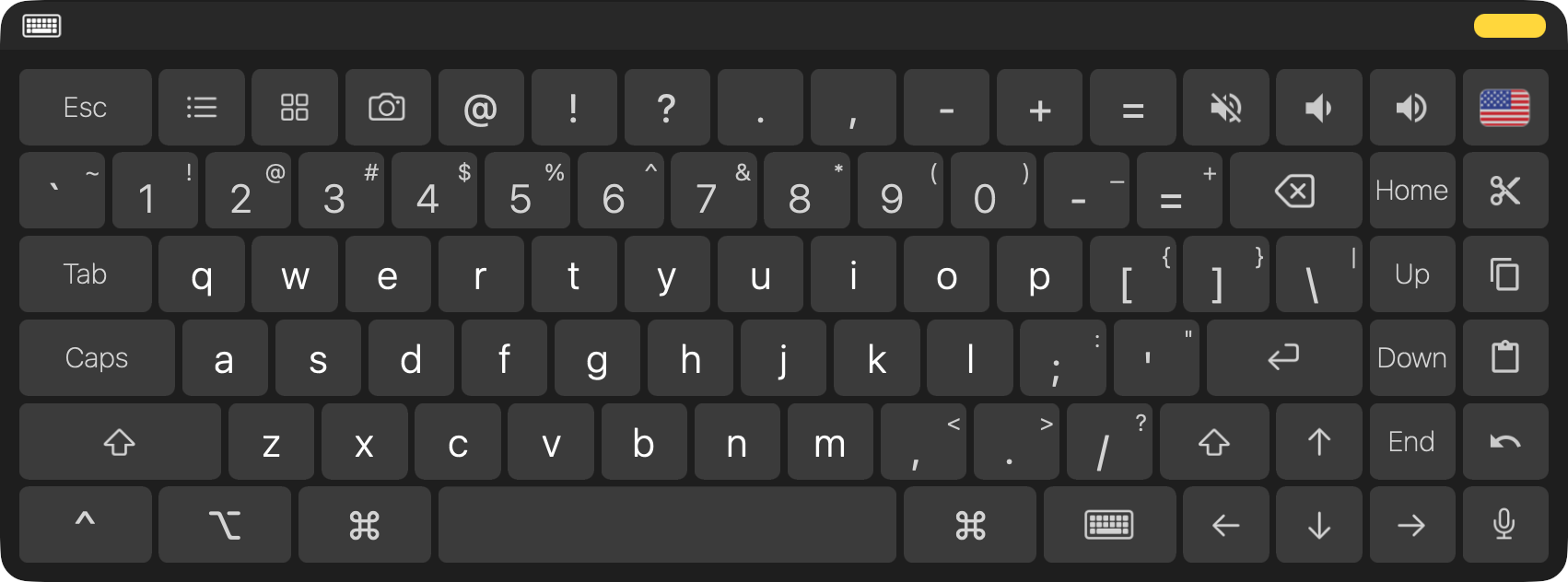
A virtual keyboard for Mac. Click the keys with a head mouse, an eye tracker or a trackball. It floats above every window and never takes the focus from the app you are typing into.
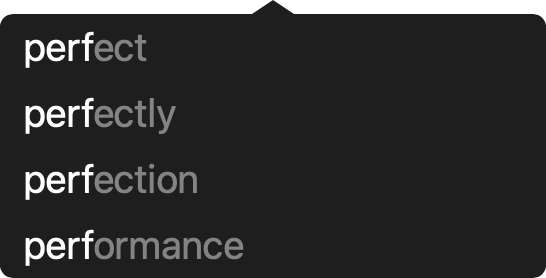
AllyKeyboard typing into a note, key by key. Under the keyboard a balloon offers the rest of each word as it is typed; some words are picked from it, others typed to the end.
Why another on-screen keyboard
Made for typing all day with your head.
macOS comes with a good on-screen keyboard of its own, and for occasional typing it does the job well. AllyKeyboard is made for a different day: typing everything with a head tracker, for hours, where every extra aim costs effort.
One big button — and no closing it by a near miss.
Small title-bar buttons side by side are hard to hit with a head tracker, and closing a keyboard when you meant to minimise it means a trip through settings. AllyKeyboard has a single large yellow button that only ever tucks it into a small floating launcher; one click brings it back.
Taken in at a glance.
Suggestions in a row, right beside the keys you are aiming at, have to be read word by word. AllyKeyboard shows them in a balloon above or below the keyboard, one word per line: a column is scanned in one look, the keys stay clear, and the keyboard can be smaller.
Like the look of Apple's keyboard? Choose the Accessibility Keyboard layout — the same keys in the same places, with AllyKeyboard's suggestions and its one-button hiding.
Suggestions
A column of words that knows yours.
- From the first letter — up to four endings of the word you are typing, yours first. How it learns ↓
- Arrow keys and Return walk the balloon and put in the chosen word — or just click it.
- Smart space. A picked word comes with a space; punctuation typed next takes it back.
- Saved phrases — a phrases key opens a list of your own sentences.
Learning stays on your Mac, and nothing typed into a password field is kept.
Suggestions that learn
It learns how you write.
Not a fixed word list. AllyKeyboard keeps count of the words you finish and of which word you write after which — and puts yours first. The more you type with it, the fewer letters a word takes.
Your words, first
Every word you finish adds to its score. The words you use most go to the top of the balloon, from their first letter.
Names and terms it didn't know
A word no dictionary has — a name, a street, a medicine, a command — is offered once you have typed it about twice. Or add it by hand in Settings.
Your phrases, word by word
It remembers what you write after each word. After a word and a space the balloon offers what usually comes next, so a phrase you use often is finished by picking, not typing.
Three picks, not a letter typed — once you have written the phrase a couple of times before.
It goes by what you have written before, not by meaning: only the word before counts. Words you stop using fade — a word's score halves for every month without use — so last year's project makes way for this one. It all stays on your Mac; nothing typed into a password field is learned, and learning can be turned off in Settings.
Two languages, one key
The letters you see are the letters you get.
The language key shows the flag of the input source in use and switches to the next one enabled in macOS with a single click. The keys relabel at once and type in the new language.
Moving around the text
Home, Page Up, Page Down, End.
For people who work with text all day, the Extended layout has a column of navigation keys beside the arrows: to the start or end of the line, a screen up or down, without reaching for a scroll bar. With ⇧ armed they select as they move; with ⌘, Home and End go to the start and end of the whole document.
Typing
Small comforts that add up.
Never steals focus
A panel above every window, full-screen apps included; clicking a key never takes the focus from where you type.
Sticky modifiers
⇧ ⌃ ⌥ ⌘ and fn wait for the next key and light up red — no holding two keys at once.
Quiet, large keys
Letters bright, service keys dimmed until the pointer is on them; a pointing hand over every key.
Drag to move
Drag any key to move the keyboard; a plain click still types.
Show by itself
Optional: a click into an empty text field brings the keyboard up, and a click elsewhere tucks it away.
App switcher
The running apps as large icons; picking one also restores its minimised windows, which ⌘Tab does not.
Layouts you can change
Four built in, and any of your own.
Standard, Standard Multilingual, Extended and Accessibility Keyboard — macOS's own, with a real fn key and half-height arrows. Switch from the menus or a key.
A click-only editor: no drag and drop, no double clicks, nothing shown only on hover. Change key sizes, gaps and rows; give any key a character, text, a shortcut or a series of them, a system event — sound, brightness, music, Mission Control — an app, a Shortcut or an AppleScript. Pick its icon, even a second one it switches to on every other press, for a microphone key that starts and stops Dictation. Layouts are shared as files.
The layout editor in detail
Install
Free, for macOS 26 and later.
Install with Homebrew, then allow AllyKeyboard in System Settings → Privacy & Security → Accessibility — that is what lets it type for you — and restart it.
AllyKeyboard runs in your session and cannot appear on the login window. macOS's own Accessibility Keyboard can: turn it on in System Settings → Lock Screen → Accessibility Options.
# once
brew tap umkasanki/tap
brew trust umkasanki/tap

# AllyKeyboard
brew install --cask allykeyboard
Inspired by Hot Virtual Keyboard on Windows.